Planning
Plan sprints, capacity and roadmaps of your teams with Jira Assistant
Browse this sectionPlanning / Program Planner
General
Planning
Pivot Report
Reports
Settings
Miscellaneous
Program Planner BETA
Program Planner helps plan the work of several teams together for a quarter or a Program Increment (PI). It shows the features of all the teams on a program board by team and iteration, compares the planned work with the capacity of each team, and keeps the dependencies, objectives, risks and confidence votes of the plan in one place.
Available in: the Jira Assistant app for Jira Cloud only, from the menu Planning Program Planner. Plans are kept in the app storage of your Jira site.
Terminology: the planner uses neutral terms by default (Quarter plan, Iteration, Objectives, Stretch). Choose SAFe terminology in the program settings to use PI, IP iteration, PI Objectives, Business value, Uncommitted and the ROAM board instead.
Getting started
- Create a plan with a name, dates and the boards of the teams. Each board is one team.
- Match by dates picks the sprints of each team that fall in the plan. Adjust them per team if needed, and mark the last iteration as the planning (IP) iteration when you use one.
- A new plan can copy the teams of an earlier one.
- Program settings () choose the terminology, how columns line up, where objectives and risks are stored, which issue types are features, which link type is a dependency, and who can change plans.
Team capacity uses the same team settings and leave as the Sprint Planner, so set up each team there first.
Program board
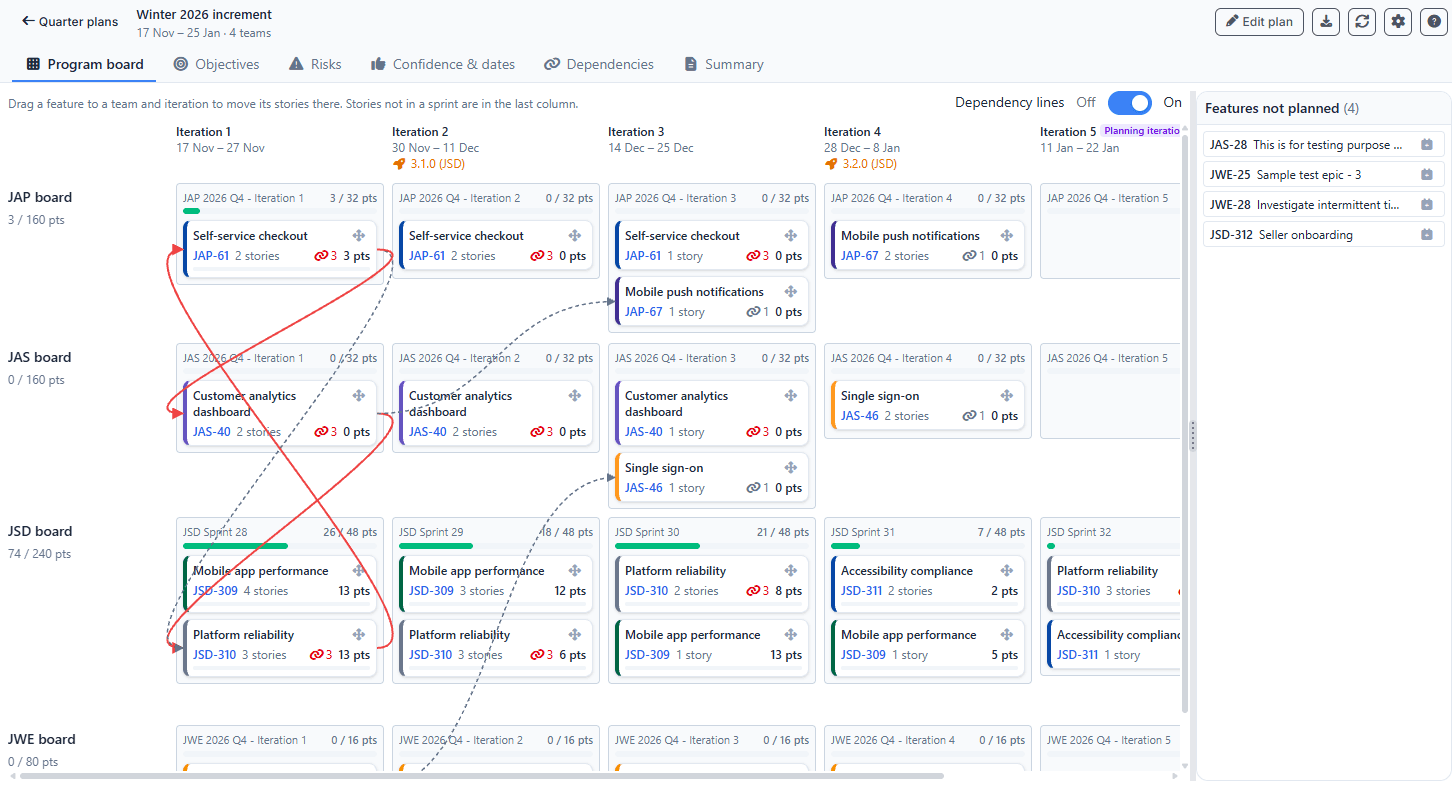
- Rows are teams and columns are iterations. A feature appears in every cell that holds its stories, with the count and estimate of those stories.
- Teams with different sprint lengths are lined up by date: each sprint goes into the iteration it overlaps most. Switch to each team's own sprints in the settings.
- Each cell shows the planned estimate against the team's capacity for that iteration, including leave.
- Drag a feature to a team and iteration to move its not-done stories of that team into the team's sprint. A preview lists the stories first and you can untick some. Done stories never move. The button does the same without dragging.
- Stories that are in no sprint of the plan are in the last column of their team, so missing breakdown is visible.
- Features not planned anywhere are listed on the right. Drag them onto the board or use the plan button.
- A feature without stories can still be placed in a team and iteration with a rough estimate, which counts against the team's capacity. Once the feature has stories, the board shows it where its stories are and the rough placement is removed.
Dependencies
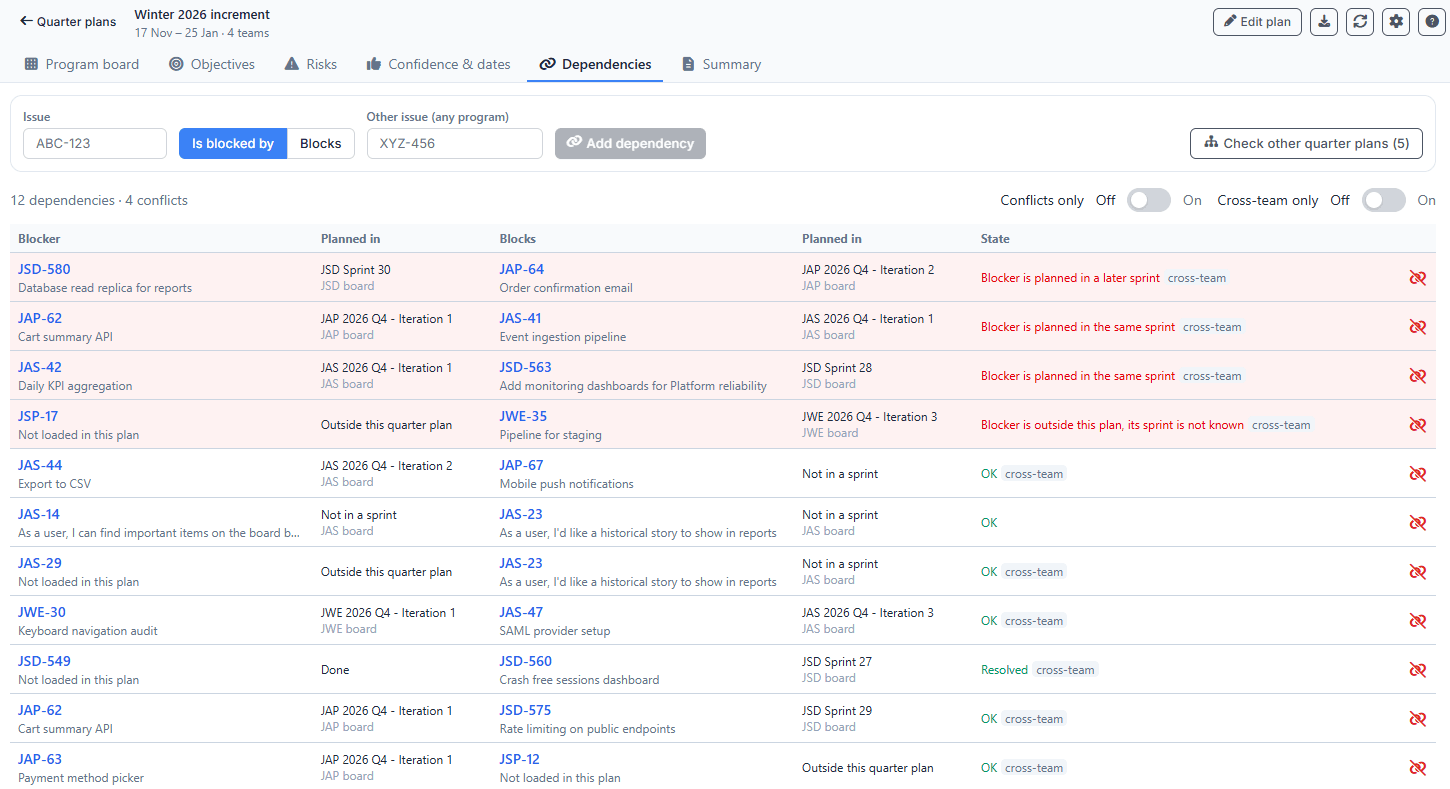
- Dependencies are Jira issue links of the chosen link type. Lines on the board connect dependent features, and red lines are conflicts.
- A conflict means the blocker is planned in the same or a later sprint than the issue it blocks, or in no sprint.
- The Dependencies view lists every dependency with filters for conflicts and cross-team ones. Add dependency links any two issues, also issues outside the plan.
- Check other plans looks up the issues outside the plan and shows the team, sprint and plan they are planned in, so dependencies on other programs are compared by sprint dates.
Objectives, risks and confidence
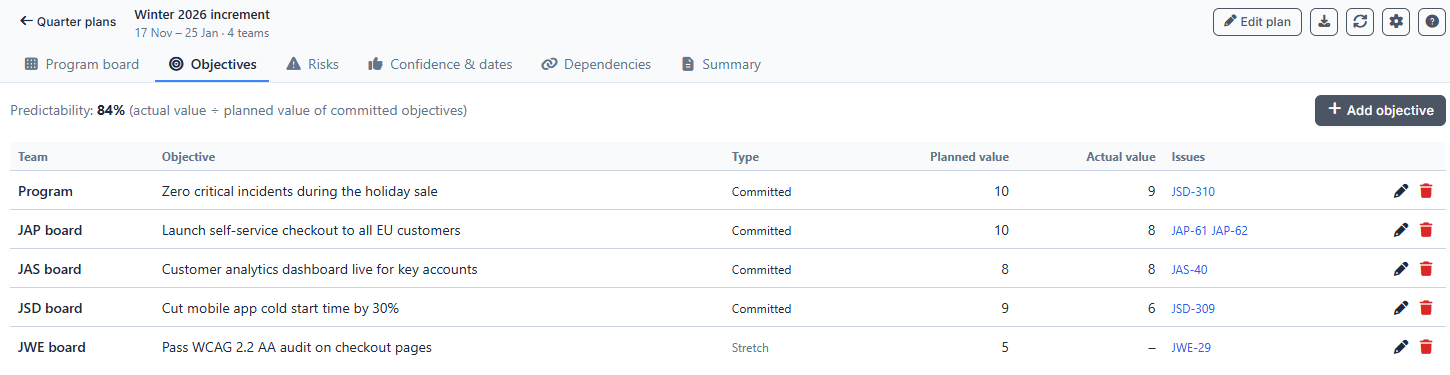
- Objectives are kept per team and for the whole program, as committed or stretch (uncommitted), with planned and actual value (1 to 10) and linked issues.
- Predictability is the actual value of committed objectives divided by their planned value.
- Risks have an owner, a team, linked issues and a status: Open, Resolved, Owned, Accepted or Mitigated.
- Objectives and risks can be stored as Jira issues of a chosen type, so they can be searched in Jira.
- Confidence votes (1 to 5) are recorded per team and for the program and kept as a history. Custom key dates and the releases of the teams' projects are shown on the board.
Summary and export
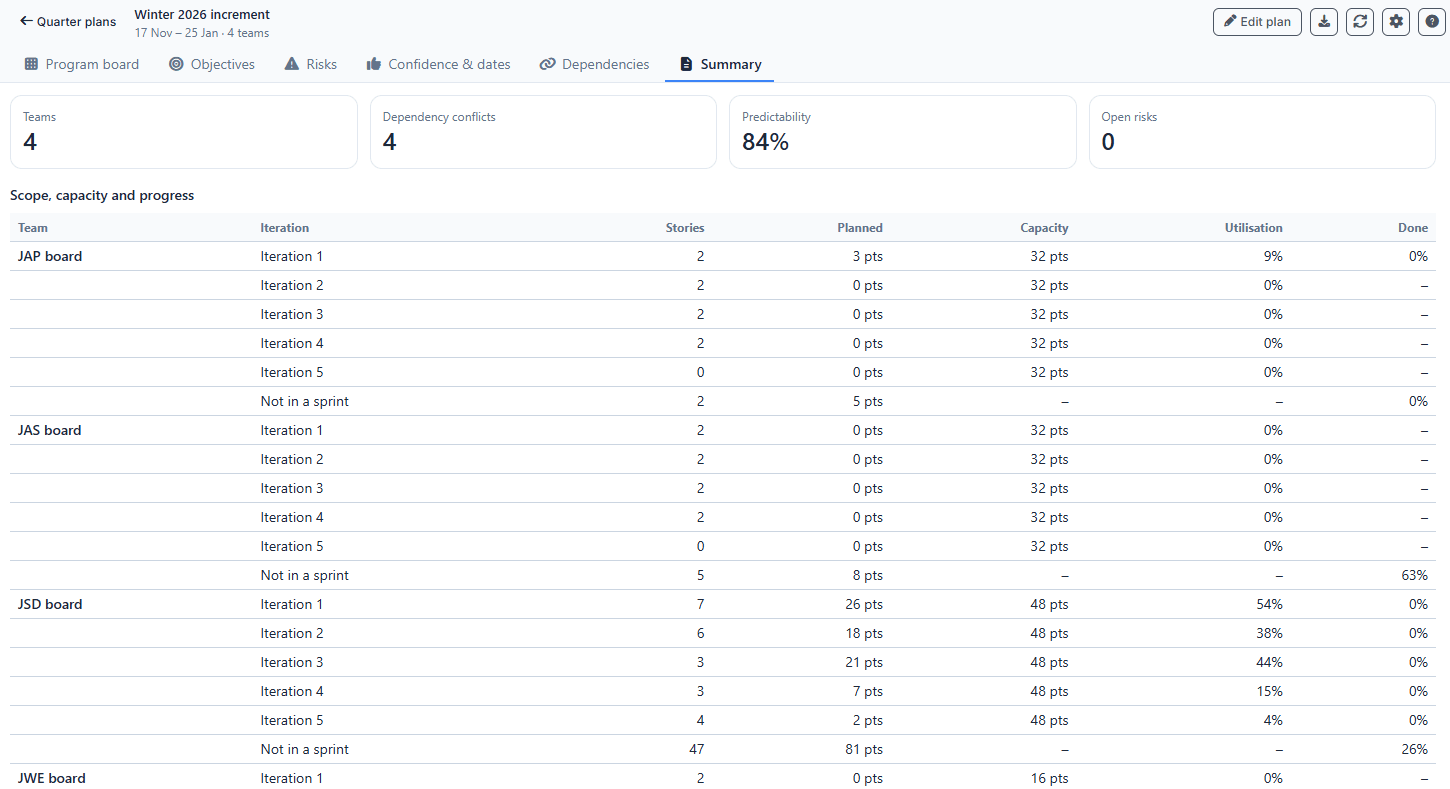
- Summary shows the scope, capacity use and progress per team and iteration, dependency conflicts, objectives with their value and risks by status.
- exports the current view to Excel.
- Plans, objectives, risks and votes are stored in the Jira Assistant app on your Jira site. Story moves and dependencies are written to Jira.